Android
业务集成
即时消息集成涉及到即时消息对象类(JCMessageChannelItem)及其属性:
| 属性 | 说明 |
| String messageId | 消息唯一标识 |
| String messageType | 消息内容类型 |
| String text | 消息内容,包括文本和自定义消息体内容 |
| String fileUri | 文件链接,可以通过 JCStorage 将文件上传至 Juphoon Cloud 平台来获取该地址,也可以从其他文件消息获取改地址 |
| String thumbPath | 缩略图路径,图片,视频消息有效 |
| int fileSize | 文件大小(字节) |
| int duration | 文件时长,语音,视频消息有效 |
| Map<String, String> extraParams | 自定义参数集 |
| String userId | 消息对端用户标识 |
| String displayName | 消息对端昵称 |
| String groupId | 返回群id,群组标识,type 为 Group 时有效 |
| long time | 发送或者接收时间,单位毫秒 |
| long sentTime | 发送成功时间,单位毫秒,如果是收到消息则是服务器记录的该消息发送时间 |
| @JCMessageChannel.ItemDirection int direction | 消息发送还是接收,see com.juphoon.cloud.JCMessageChannel.ItemDirection |
| @JCMessageChannel.Type int type | 一对一消息还是群组消息,参见 Type |
| @JCMessageChannel.ItemState int state | 消息状态,see com.juphoon.cloud.JCMessageChannel.ItemState |
| @JCMediaChannel.MediaChannelReason int reason | 消息错误,当消息状态为 STATE_SENDFAIL 时有效 |
消息类型(Type)有以下几种:
/**
 * 一对一消息
 */
public static final int TYPE_1TO1 = 0;
/**
 * 群组消息
 */
public static final int TYPE_GROUP = 1;
消息传输方向(ItemDirection)有:
/**
 * 发送
 */
public static final int DIRECTION_SEND = 0;
/**
 * 接收
 */
public static final int DIRECTION_RECEIVE = 1;
消息集成
开始集成消息功能前,请先进行 模块的初始化
// 初始化各模块,因为这些模块实例将被频繁使用,建议声明在单例中
JCClient client = JCClient.create(Context, "your appkey", this, null);
JCMessageChannel messageChannel = JCMessageChannel.create(client, this);
其中,创建 JCMessageChannel 实例的方法如下
/**
 * 创建 JCMessageChannel 对象
 *
 * @param client   JCClient 对象
 * @param callback JCMessageChannelCallback 回调接口,用于接收 JCMessageChannel 相关通知
 * @return 返回 JCMessageChannel 对象
 */
public static JCMessageChannel create(JCClient client, JCMessageChannelCallback callback)
开始集成
消息类型分为两种:文本消息和文件消息。
发送消息
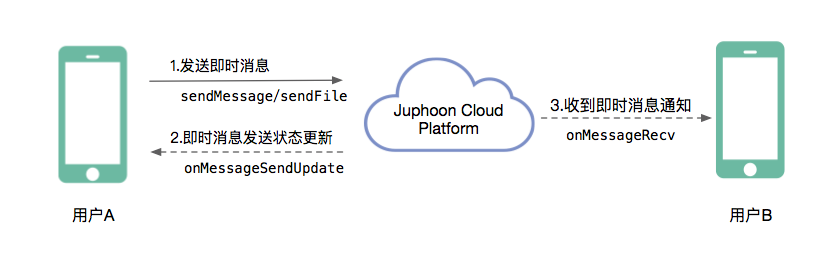
假如用户 A 想给用户 B 发送即时消息,则可以调用接口如下:
- 发送文本消息
/**
 * 发送文本消息, 文本内容不要超过10KB
 *
 * @param type        类型,参见 JCMessageChannelType
 * @param keyId       对方唯一标识,当 type 为 JCMessageChannelType1To1 时为用户标识,当 type 为 JCMessageChannelTypeGroup 时为群组标识
 * @param messageType 文本消息类型,用户可以自定义,例如text,xml等
 * @param text        文本内容
 * @param extraParams 自定义参数集
 * @return 返回 JCMessageChannelItem 对象,异常返回 null
 */
public abstract JCMessageChannelItem sendMessage(@Type int type, String keyId, String messageType, String text,
                                                 Map<String, String> extraParams);
- 发送文件消息
/**
 * 发送文件消息
 *
 * @param type        类型,参见 JCMessageChannelType
 * @param keyId       对方唯一标识,当 type 为 JCMessageChannelType1To1 时为用户标识,当 type 为 JCMessageChannelTypeGroup 时为群组标识
 * @param messageType 文件消息类型,用户可以自定义,例如image,video等
 * @param fileUri     文件链接地址
 * @param thumbPath   缩略图路径,针对视频,图片等消息
 * @param size        文件大小
 * @param duration    文件时长,针对语音,视频等消息
 * @param extraParams 自定义参数集
 * @return 返回 JCMessageChannelItem 对象,异常返回 nil
 */
public abstract JCMessageChannelItem sendFile(@Type int type, String keyId, String messageType, String fileUri, String thumbPath,
                                              int size, int duration, Map<String, String> extraParams);
示例代码:
// 发送文本消息
JCMessageChannelItem item = messageChannel.sendMessage(JCMessageChannel.TYPE_1TO1, KeyId, "text", content, null);
// 发送文件消息
 JCMessageChannelItem item = messageChannel.sendFile(JCMessageChannel.TYPE_1TO1, userId, fileType, content, null/*缩略图路径*/, 0/*文件大小*/, 0/*时长*/, null);
A 发送即时消息后,会收到 onMessageSendUpdate 回调
/**
 * 消息发送状态更新
 *
 * @param message IM消息对象,通过该对象可以获得消息的属性及状态
 * @see JCMessageChannelItem
 */
void onMessageSendUpdate(JCMessageChannelItem message);
其中,消息状态(ItemState)有:
// 消息初始状态
public static final int ITEM_STATE_INIT = 0;
// 消息发送中状态
public static final int ITEM_STATE_SENDING = 1;
// 消息发送成功状态
public static final int ITEM_STATE_SENDOK = 2;
// 消息发送失败状态
public static final int ITEM_STATE_SENDFAIL = 3;
// 收到消息
public static final int ITEM_STATE_RECEIVED = 4;
示例代码:
public void onMessageSendUpdate(JCMessageChannelItem message) {
    if (message.getState() == JCMessageChannel.ITEM_STATE_SENDING) {
        // 消息发送中
    } else if (message.getState() == JCMessageChannel.MESSAGE_SEND_OK) {
        // 消息发送成功
    } else if (message.getState() == JCMessageChannel.ITEM_STATE_SENDFAIL) {
        // 消息发送失败
    }
}
如果消息发送失败,原因有以下几种:
// 无异常
public static final int REASON_NONE = 0;
// 未登录
public static final int REASON_NOT_LOGIN = 1;
// 消息内容太长
public static final int REASON_TOO_LONG = 2;
// 其他错误
public static final int REASON_OTHER = 100;
接收消息
即时消息发送成功后,用户 B 会收到 onMessageRecv 回调
/**
 * 收到消息通知
 *
 * @param message IM消息对象,通过该对象可以获得消息的属性及状态
 * @see JCMessageChannelItem
 */
void onMessageRecv(JCMessageChannelItem message);
示例代码:
public void onMessageRecv(JCMessageChannelItem message) {
    if (message.getState() == JCMessageChannel.ITEM_STATE_RECEIVED) {
        // 收到消息
    }
}